Workflow Overview
The workflow diagram below illustrates the complete integration flow from start to finish. Each step shows the data exchange between systems.
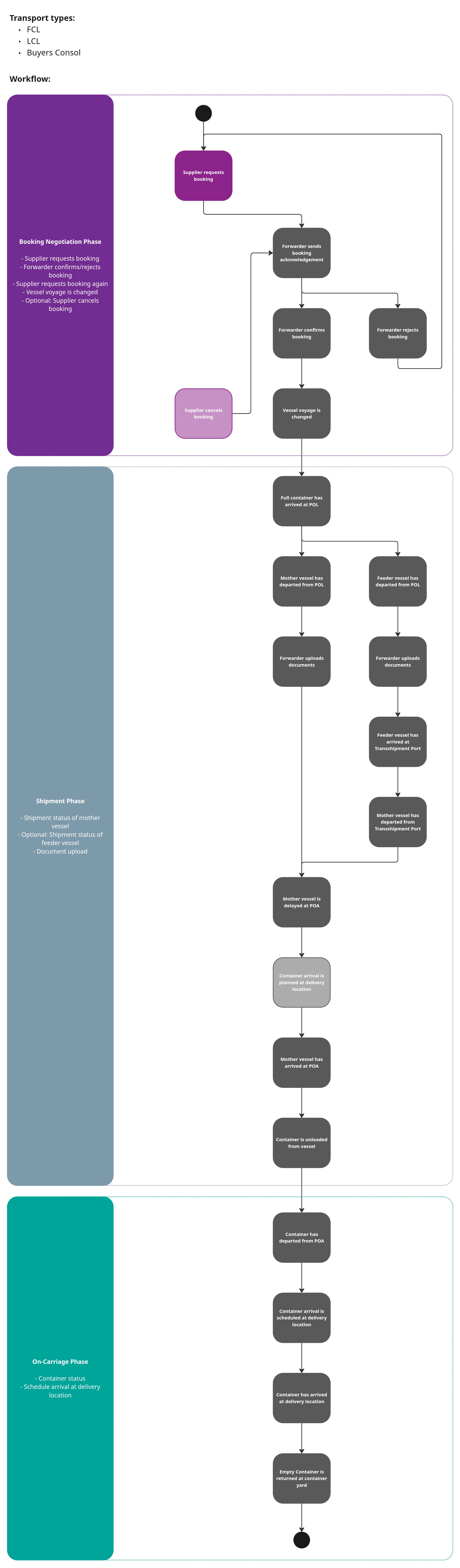
This integration handles different shipment scenarios for sea freight:
Feeder Vessel: For shipments with multiple legs, the vessel of the first leg is always named as Feeder Vessel. It doesn't make a difference if it is a feeder vessel or the mother vessel in reality. The transport data, e.g. loading and discharge with their dates, for the feeder vessel are set in the feeder section within the shipment structure. For shipments with only single leg, the feeder section isn't used and isn't set in the shipment structure. Please look into the detailed examples in Integration Details. The structure of the booking doesn't have any feeder information.
Mother Vessel: For shipments with single leg, vessel is named as Mother Vessel. All information of the transport data, e.g. loading and discharge with their dates, are set in the timetable section within the shipment structure. In case there are multiple legs for one shipment the mother vessel is always the last vessel to the final discharge port. The transport data of the final leg are set as loading and discharge etc in the timetable section. If there are more then two legs for a shipment the legs between the first and the last are ignored and not captured via api.
